|
|
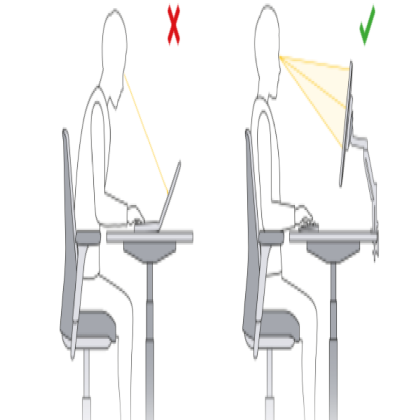
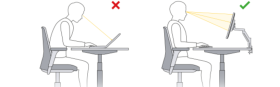
Abstract This article explores the significant role of monitor arms in creating ergonomic workspaces. Ergonomics is crucial for reducing the risk of musculoskeletal disorders and improving overall productivity. By allowing for easy adjustment of monitor height, angle, and position, monitor arms contribute to a more comfortable and healthy working environment. 1. Introduction In today's digital - dominated world, people spend long hours in front of computer monitors. Prolonged sitting in an improper position can lead to various health problems, such as neck pain, back pain, and eye strain. Ergonomic workspaces are designed to minimize these risks, and monitor arms play a vital role in achieving this goal. 2. Ergonomic Principles and Monitor Arms 2.1 Adjustable Height One of the key ergonomic principles is to have the monitor at the correct eye level. A monitor arm allows users to easily adjust the height of the monitor. For an average - height user sitting at a standard desk, the top of the monitor should be at or slightly below eye level. This reduces the need to tilt the head up or down for long periods, which can cause neck strain. With a monitor arm, a user can quickly raise or lower the monitor to the optimal height. 2.2 Tilt and Swivel Adjustments Tilt and swivel adjustments provided by monitor arms are also important for ergonomics. Tilt adjustments help in reducing glare from lights. By tilting the monitor, the user can find the best angle to minimize reflections on the screen. Swivel adjustments, on the other hand, allow the user to change the viewing angle without having to twist the entire body. This is especially useful when sharing information or collaborating with colleagues. 3. Reducing Musculoskeletal Disorders 3.1 Neck and Shoulder Pain Studies have shown that improper monitor placement is a major cause of neck and shoulder pain. When the monitor is too low or too high, the user has to constantly strain the neck and shoulders to view the screen. Monitor arms can help in alleviating this problem. By allowing for easy height and angle adjustments, users can maintain a more natural and relaxed posture, reducing the stress on the neck and shoulder muscles. 3.2 Back Pain A well - adjusted monitor arm can also contribute to reducing back pain. When the monitor is in the correct position, the user is less likely to slouch or hunch over. This helps in maintaining a proper spinal alignment, reducing the risk of back pain associated with poor posture. 4. Improving Productivity 4.1 Comfort and Focus An ergonomic workspace created with the help of monitor arms can improve productivity. When users are comfortable, they are less likely to be distracted by physical discomfort. They can focus better on their work, leading to increased efficiency. For example, a user who does not have to constantly adjust their position to view the monitor can concentrate more on the task at hand. 4.2 Easy Access to Information Monitor arms also allow for easy access to information. In a multi - monitor setup, the ability to swivel and adjust the monitors makes it easier for users to switch between different applications or documents, saving time and increasing productivity. 5. Case Studies 5.1 Office A In Office A, a company implemented monitor arms in their workstations. After a few months, employees reported a significant reduction in neck and shoulder pain. The adjustable monitor arms allowed them to customize the position of their monitors according to their needs. As a result, productivity also increased, with employees reporting that they could work more efficiently without being distracted by physical discomfort. 5.2 Home Office B A home office user, who used to have a fixed - position monitor, installed a monitor arm. The user found that the ability to adjust the monitor's height and angle made working for long hours more comfortable. The user also noticed that they could focus better on their work, leading to a higher quality of output. 6. Conclusion Monitor arms are an essential component of ergonomic workspaces. By enabling easy adjustment of monitor position, they contribute to reducing musculoskeletal disorders and improving productivity. Employers and individuals should consider investing in monitor arms to create a more comfortable and healthy working environment. |